AI Logo Generators vs a Professional Logo Designer – Key Differences
Creating a logo has become easier than ever. Today, businesses can enter their name, choose a style, and generate multiple logo concepts using an AI tool within minutes. At the same time, professional logo designers continue to offer a more strategic and customized approach to building a brand identity.
This raises an important question: should you use an AI logo maker vs designer when creating your business logo?
Both options have their place. An AI logo generator can be useful when you need a quick and affordable starting point, while a professional designer can develop a logo around your brand strategy, audience, positioning, and long-term requirements.
Let’s understand the key differences between AI-generated logos and professional logo design and when each approach may be suitable for your business.
What Is an AI Logo Generator and How Does AI Logo Design Work?
An AI logo generator is a digital tool that uses artificial intelligence, templates, algorithms, or generative models to create logo concepts based on information such as your business name, industry, preferred colours, fonts, and design style.
Most tools allow users to generate several concepts and customize elements such as typography, colours, icons, and layouts. Some platforms also provide downloadable files in formats suitable for digital and print applications.
The main advantage of AI logo design is speed. You can explore different directions without going through a lengthy design process.
However, the quality and originality of the result can vary depending on the tool, prompts, customization options, and the level of strategic input behind the design.
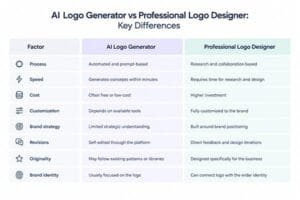
The difference is therefore not simply about technology versus humans. It is about the depth of strategy, customization, collaboration, and long-term brand application.
1. Speed and Convenience
One of the biggest benefits of a free AI logo maker is speed.
You can enter your business information, select preferences, review concepts, and make basic adjustments within a short period. This can be useful for early-stage businesses, temporary projects, or businesses that need a simple visual quickly.
A professional designer follows a more involved process. They may begin with a design brief, research, competitor analysis, concept development, feedback, and revisions before finalizing the logo.
If speed is the main requirement, AI can provide a convenient starting point.
2. Brand Strategy and Customization
A logo should represent more than the business name. It should fit the brand’s positioning, audience, personality, and market.
An AI tool can generate designs based on the information you provide, but it does not replace the strategic conversations involved in understanding a business.
A professional logo designer can ask questions about your brand, competitors, audience, goals, and future plans before developing concepts.
This allows custom logo design to be connected to the broader brand strategy rather than treating the logo as an isolated graphic.
3. Originality and Brand Recognition
AI-generated logos can produce many visual variations quickly. However, depending on the platform, some tools may rely on shared templates, icons, patterns, or design conventions. This can increase the possibility of visually similar results across different businesses.
A designer can develop a visual concept specifically around the business and refine details such as proportions, typography, spacing, symbolism, and visual balance.
For businesses building a long-term identity, these details can become important across multiple brand applications.
4. Flexibility Across Brand Touchpoints
Your logo may appear on a website, social media profile, packaging, presentations, signage, business cards, advertisements, and merchandise.
An AI tool may provide useful downloadable formats, but businesses should check exactly what files, variations, and editing options are included before choosing a platform.
When you hire a logo designer, you can discuss different logo versions and applications as part of the design process.
This can include primary and secondary logo variations, monochrome versions, icons, typography, and guidelines for consistent usage.
5. Cost and Long-Term Value
One of the most obvious differences is cost.
A free AI logo maker can help businesses create a logo with little or no upfront design cost. This may be practical when testing an early business idea or working with a very limited budget.
Professional design involves a larger investment because you are paying for research, strategy, creative development, revisions, expertise, and final brand assets.
The logo designer cost therefore depends on the scope of work, designer or agency experience, number of concepts, revisions, deliverables, and whether the project includes broader brand identity development.
When Should You Use an AI Logo Generator?
An AI logo generator may be useful when:
- You are testing a business idea
- You need a temporary logo
- You have a very limited budget
- You want to explore visual directions
- You need a basic logo quickly
It can be a useful starting point, especially when the immediate requirement is speed rather than a complete brand identity.
When Should You Hire a Professional Logo Designer?
Consider working with a professional when your logo is going to become the foundation of a serious, long-term brand.
A designer can help when you need:
- A distinctive visual identity
- Strategic brand direction
- Custom logo design
- Multiple logo variations
- Consistent brand applications
- Professional design guidance
- A complete brand identity system
The decision between AI vs human graphic designer should therefore depend on your business stage, goals, budget, and how important the logo is to your long-term brand presence.
Reach Us for Brand Identity Design Agency in Pune
A logo is only one part of a complete brand identity. It needs to work with your colours, typography, visual language, communication, and other brand touchpoints.
At Branduo Studio, we approach brand design by understanding the business, audience, positioning, and visual direction before developing the identity. Our brand design services include naming and brand identity design, visual design language, marketing collateral, packaging, event design, and social media branding.
If you’re looking for a Brand Identity Design Agency in Pune for custom logo design and a consistent visual identity, connect with Branduo Studio.
FAQs
1. What is the difference between an AI logo maker and a professional designer?
An AI logo maker automates logo generation based on user inputs, while a professional designer develops concepts through research, strategy, creative thinking, collaboration, and revisions.
2. Is a free AI logo maker good for a business?
It can be useful for early-stage ideas, temporary projects, or businesses with limited budgets. However, businesses building a long-term identity may need greater customization and strategic design input.
3. Is AI logo design cheaper than hiring a designer?
Generally, AI logo tools are less expensive, with some offering free options. Professional design costs more because it involves customized creative and strategic work.
4. Can AI-generated logos be used commercially?
Usage rights vary between platforms. Always review the specific tool’s licensing, ownership, and commercial-use terms before using an AI-generated logo for a business.
5. How much does a professional logo designer cost?
Logo designer cost varies depending on experience, project scope, research, revisions, deliverables, and whether the work includes only a logo or a complete brand identity.
6. Should I hire a logo designer or use AI?
Consider your business stage and requirements. AI can be useful for quick exploration, while a professional designer can provide a more customized and strategy-led approach for an established or growing brand.
Final Thoughts
AI has made logo creation faster and more accessible, but creating a strong brand identity involves more than generating a visual.
An AI logo generator can be useful for exploring ideas, testing concepts, or creating a simple logo quickly. A professional designer can take a deeper approach by connecting the logo with your brand strategy, audience, positioning, and long-term visual identity.
Before choosing between the two, consider what your business needs today and where you want the brand to go next.